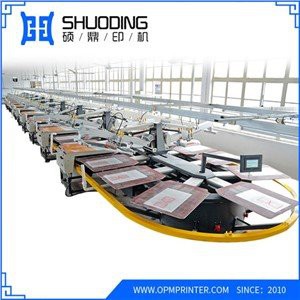
Hey there! I'm working for a supplier of Automatic Printing Machines, and today I want to share some tips on how to upgrade an Automatic Printing Machine.
Let's start by understanding why you might want to upgrade your automatic printing machine. As technology advances, older machines can quickly become less efficient, less accurate, or simply unable to meet the growing demands of your business. Upgrading can enhance productivity, improve print quality, and even save you money in the long run.
Assessing Your Current Machine
The first step in upgrading your automatic printing machine is to assess its current state. Take a good look at its performance. Are there any recurring issues like misaligned prints, slow printing speeds, or frequent breakdowns? Check the age of the machine and the technology it uses. If it's several years old, it might be due for an upgrade.
Look at the features your machine currently has. Does it support the latest printing materials and finishes? Can it handle different sizes and types of jobs? Understanding what your machine can and can't do will help you determine what kind of upgrade you need.
Identifying Your Upgrade Needs
Once you've assessed your current machine, it's time to identify your upgrade needs. This depends on your business requirements. If you're in a high - volume printing business, you might need an upgrade that increases the printing speed. For those who focus on high - quality prints, an upgrade that improves color accuracy and resolution would be ideal.
Think about the types of jobs you handle. If you often print on different materials like plastics, metals, or fabrics, you'll need a machine that can adapt to these diverse substrates. Maybe you want to add new features like variable data printing or UV curing.
Upgrading the Software
One of the easiest and most cost - effective ways to upgrade an automatic printing machine is by updating its software. Software updates can bring new features, improve performance, and fix bugs.
Most modern automatic printing machines allow for remote software updates. You can usually download the latest software from the manufacturer's website and install it on your machine. This can enhance the machine's functionality, such as improving the user interface, adding new printing modes, or optimizing the print quality.
Upgrading the Hardware
If software upgrades aren't enough, you might need to consider hardware upgrades. This could involve replacing parts like the print heads, motors, or controllers.
Print heads are a crucial component of an automatic printing machine. Upgrading to a higher - quality print head can significantly improve print quality. Newer print heads often have better ink distribution, which results in sharper and more vibrant prints.
Motors are responsible for moving the print heads and the substrate. Upgrading to more powerful and precise motors can increase the printing speed and accuracy.
Controllers manage the operation of the machine. A newer controller can offer better control over the printing process, allowing for more precise adjustments and faster response times.
Considering a Complete Overhaul
In some cases, it might be more cost - effective to replace the entire machine rather than just upgrading parts. If your machine is very old or has significant mechanical issues, a new automatic printing machine can offer a fresh start.
When considering a new machine, look for one that has the latest technology and features. It should be able to handle your current and future printing needs. You can check out our Automatic Printing Machine for a wide range of options.
Training and Support
After upgrading your automatic printing machine, it's important to ensure that your staff is trained to use the new features and capabilities. Most suppliers, including ours, offer training programs to help your team get up to speed.
We also provide ongoing support to ensure that your machine runs smoothly. If you encounter any issues, our technical support team is just a call away.
Comparing with Manual Printing Machines
Before making a decision, it's worth comparing automatic printing machines with Manual Printing Machine. Manual printing machines are often more affordable upfront, but they require more labor and have lower productivity.
Automatic printing machines, on the other hand, offer higher efficiency, better accuracy, and the ability to handle large - scale jobs. They are a great investment for businesses that want to increase their output and improve the quality of their prints.
Making the Decision
Upgrading an automatic printing machine is a big decision. It requires careful consideration of your business needs, budget, and long - term goals. Weigh the costs and benefits of upgrading or replacing your machine.
If you're still not sure, feel free to contact us. Our team of experts can help you assess your situation and recommend the best solution for your business. We can also provide you with detailed information about our products and services.


In conclusion, upgrading an automatic printing machine can bring many benefits to your business. Whether it's through software updates, hardware upgrades, or a complete replacement, the right upgrade can enhance your productivity, improve print quality, and give you a competitive edge in the market.
If you're interested in upgrading your automatic printing machine or have any questions, don't hesitate to reach out. We're here to help you make the best decision for your business.